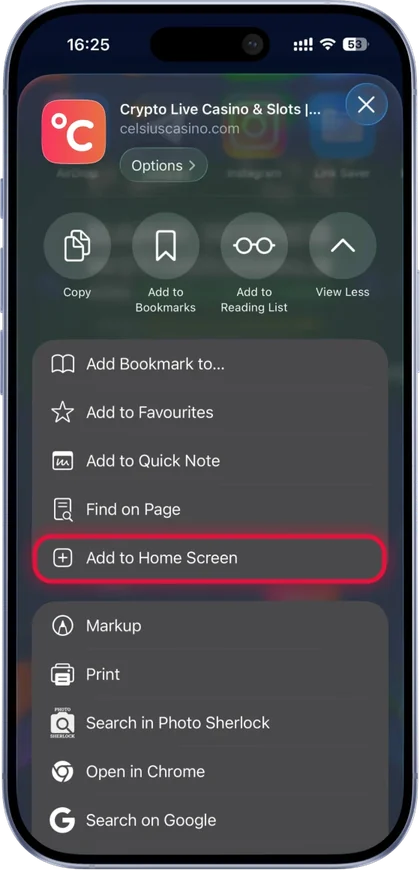
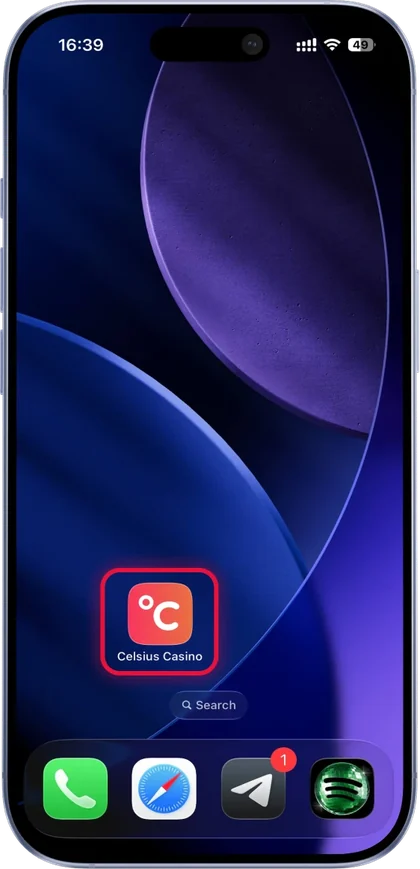
There is nothing to download from a store. Putting Celsius on your home screen takes four taps on Android or iPhone.
Android (Chrome)
iPhone (Safari)
On Android: open Chrome, go to celsiuscasino.com, tap the three dots, tap "Add to Home screen". On iPhone: open Safari, go to the site, tap Share, tap "Add to Home Screen". That is the whole Celsius Casino app. There is no download in the App Store or Google Play. Celsius runs as a progressive web app, a website that installs itself as an icon and opens full screen like an app.
Android (Chrome)
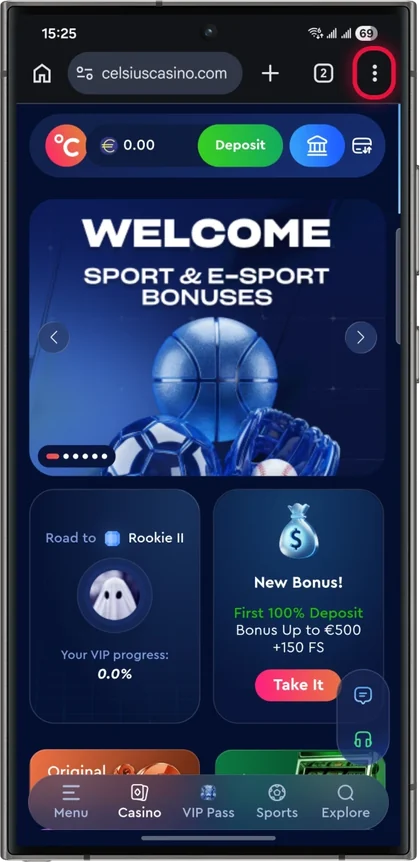
Open Chrome and go to celsiuscasino.com.
Tap the menu, the three dots in the top right corner.
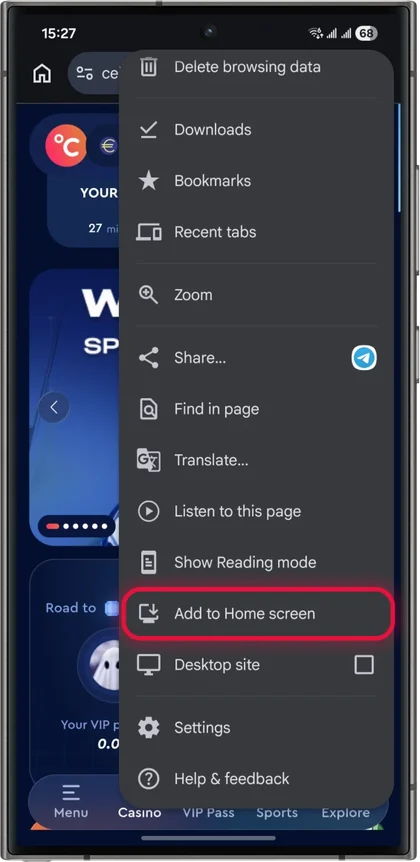
Tap "Add to Home screen".
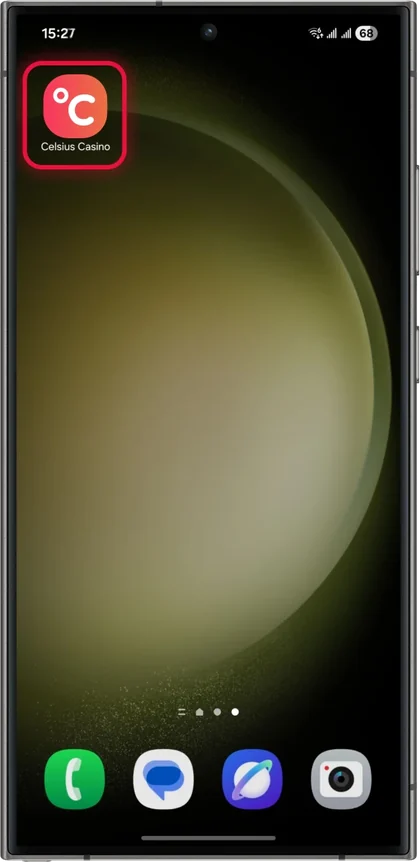
Confirm. The Celsius icon appears on your home screen.
On some Android phones the menu item reads "Install app" in place of "Add to Home screen"; it does the same thing. No APK file, no "install from unknown sources" setting to switch on. Android treats it as a shortcut that opens in its own window, so it does not need any special permissions. If a site somewhere is handing out a "Celsius Casino APK download", it is not from Celsius, and installing an unknown APK that wants your casino login is a bad idea on any phone.
iPhone (Safari)
Open Safari and go to celsiuscasino.com. It has to be Safari; other browsers on iPhone may not show the option.
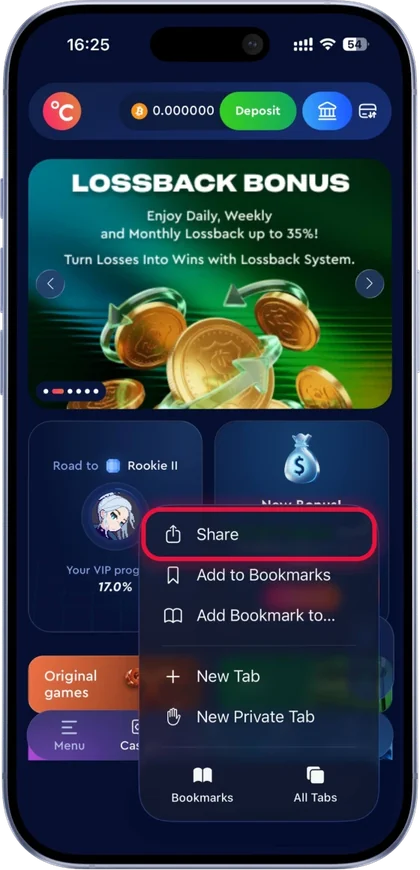
Tap the Share button, the square with the arrow pointing up.
Scroll the share sheet and tap "Add to Home Screen".
Confirm. The icon appears with your other apps.
Offshore casinos generally cannot list real-money apps in the Canadian App Store, which is why sites like Celsius use this route. Anything called "Celsius Casino" that turns up in an App Store search is not the casino.
What you get from the home screen icon
The icon opens Celsius full screen without the browser bars, so you get a bit more room for the game window. Your login stays saved the way it does in the browser. The whole site is there: the 6,000+ slots, 800+ live tables, 200+ game shows, the sportsbook, the originals, the cashier and the VIP page. It updates itself every time you open it, since it is loading the live site, so there is never an update to install.
It also takes very little storage. The web app keeps a small amount of cached data and loads the rest as needed. Games load over your connection, so a slot takes as long to open as it would in the browser.
9.4/10
#1 · Biggest game library
Celsius Casino Partner
The biggest lobby we have reviewed, a real VIP ladder, and one rule to understand before a big win.
WELCOME OFFER550% up to approx. C$3,200 (€2,000)+ 350 Free Spins
Good
6,000+ slots, 800+ live tables and 200+ game shows from about 70 studios
550% up to approx. C$3,200 (€2,000) plus 350 free spins over four deposits
Crypto withdrawals with no KYC; fiat KYC only from approx. C$1,600 (€1,000), ID only
Watch out
A weekly cash-out cap of approx. C$2,000 (€1,250), but only on wins above 10x your deposit; below 10x there is no weekly cap
The cashier lists Apple Pay and Google Pay, which are the quickest ways to deposit on a phone: your card is already in the wallet and there is nothing to type. PayPal and Interac are on the list too. Our Apple Pay and Google Pay casinos page covers the phone wallets at other sites.
Withdrawals from the phone work the same as on desktop: 24/7, no casino fees, minimum approx. C$16 (€10). Celsius quotes in euros and the CAD figures here are converted at 1.60, so they move with the exchange rate. Crypto withdrawals need no KYC. Fiat withdrawals ask for an ID only from approx. C$1,600 (€1,000), and a phone camera handles that upload in a minute. The one rule we mark against Celsius applies on any device: a win of more than 10x your deposit is paid at approx. C$2,000 (€1,250) a week. The Celsius withdrawals page has worked examples.
Live casino on mobile data
Slots and crash games use little data once the game has loaded. A live table streams video the whole time you sit at it, so it uses a lot more. If you are on a small plan, play live tables on Wi-Fi and leave Aviator and the slots for the bus. The Celsius live casino page covers the tables and the Kevin Hart promo.
Removing it
Long-press the icon and remove it like any app. On Android, removing the shortcut leaves your account and balance untouched; the same on iPhone. Your login is held by the browser, so clearing Safari or Chrome data logs you out of the home screen version too.
If the option does not appear
On iPhone the usual cause is using Chrome or another browser in place of Safari. Open the site in Safari and try again. On Android the cause is usually a private or incognito tab, where the "Add to Home screen" option can be hidden; open a normal tab. If it still will not show, bookmarking the site does the same job with one extra tap.
For casino apps at other sites, see our casino apps in Canada page. The Celsius bonus page has the welcome package, and the full Celsius review covers everything else. If you live in Ontario this site is not licensed by iGaming Ontario, so it should not be advertising to you and we do not link it for Ontario players.
TOONIE SAYS
Four taps and it's on your home screen. No store, no update nagging.
QUESTIONS
Questions and answers
Short and specific.
01Is there a Celsius Casino app?
Not in the App Store or Google Play. Celsius is a progressive web app: you add it to your home screen from the browser and it opens like an app.
02How do I download the Celsius Casino app on Android?
Open celsiuscasino.com in Chrome, tap the three-dot menu, tap "Add to Home screen" and confirm. No APK is needed.
03How do I get the Celsius Casino app on iPhone?
Open the site in Safari, tap the Share button, tap "Add to Home Screen" and confirm.
04Does the Celsius web app have all the games?
Yes. It loads the live site, so the slots, live casino, game shows, sportsbook and cashier are all there.
05Can I use Apple Pay in the Celsius app?
Apple Pay and Google Pay are both on the Celsius cashier list, along with PayPal, cards and crypto.

 CANADIAN CASINOS, CHECKED BY HAND